


Yes, MagSafe cases have magnets inside them. There is a magnetic ring and alignment magnets in every MagSafe case. Only MagSafe cases have these special parts. Regular cases or most magnetic cases do not have them. The magnets in your case connect with the iPhone’s magnets. This makes a strong snap when you put them together. The perfect fit helps your iPhone charge faster and better than non-MagSafe cases. You also get a tight fit for MagSafe accessories. This makes using your phone every day easier and more dependable.
Table of Contents
Key Takeaways
- MagSafe cases have special magnets inside them. These magnets snap to your iPhone for fast wireless charging. They also help attach accessories in a secure way.
- The magnetic ring and alignment magnets work together. They keep your phone and accessories steady. This makes them easy to use.
- MagSafe cases are thicker and a little heavier than regular cases. But they give better charging and strong support for wallets, stands, and battery packs.
- Using a MagSafe case helps your iPhone charge faster. It also holds accessories safely. This makes using your phone every day easier and more reliable.
- Always look for the MagSafe logo or compatibility notes when you buy cases. This helps you know if they have real magnets and work well with your iPhone.
magsafe case magnets

magnetic ring
Every MagSafe case has a magnetic ring inside. This ring is not just one magnet. It is made of many small magnets in a circle. Most rings have 8, 16, or 17 magnets. Using 16 magnets gives a good mix of price and how well it works. These magnets are made from sintered neodymium. Neodymium is strong and stable. The ring is about 54mm by 46mm in size. The magnets can be 0.55 mm, 1.5 mm, or 2.5 mm thick. Makers stick the ring into the case with glue. This helps the ring connect tightly to your iPhone. The ring lines up with the iPhone’s magnets. You get a perfect snap when you put on the case. This system lets you charge your phone wirelessly. It also keeps your accessories in place.
Tip: The strong magnetic lines in the ring help your iPhone charge faster and better. You do not have to worry about your phone charging slowly or being out of place.
- The magnetic ring in MagSafe cases:
- Has 8, 16, or 17 neodymium magnets.
- The magnets are in a circle for perfect fit.
- Stuck in with glue to keep them steady.
- Matches the iPhone’s magnetic ring for a tight hold.
alignment magnets
Alignment magnets are very important in MagSafe cases. These magnets are put in a careful circle inside the case. They match the iPhone’s magnets. This makes sure your case snaps into the right spot every time. The alignment magnets make a strong link between your case and your iPhone. This keeps your case and accessories attached, even if you move your phone a lot.
- Alignment magnets in MagSafe cases:
- Make sure the case lines up with the iPhone’s magnets.
- Snap the case into the best spot for wireless charging.
- Stop problems with charging or being out of place.
- Hold things like wallets, stands, and battery packs tight.
- Let you take off accessories easily but keep them secure.
MagSafe cases use neodymium magnets for both the ring and alignment magnets. These magnets work together to make a strong connection. The magnetic system keeps your case and accessories in place. You get fast wireless charging and easy use with MagSafe accessories. MagSafe technology gives you a better experience than regular cases.
magsafe cases vs regular cases

key differences
There are big differences between magsafe cases and regular iphone cases. The main difference is the magnets inside a magsafe case. These magnets make a ring that matches the iphone’s magnets. This lets the case snap onto your phone and hold things with a strong grip. Regular iphone cases do not have any magnets. They are made from silicone or hard plastic. Their main job is to protect your phone. Most regular cases do not have any magnetic parts.
Magsafe cases are a little thicker than regular iphone cases. The magnets need more space, so the case feels a bit heavier and bigger. Some brands try to make magsafe cases thin, but you might still notice a small change. Regular iphone cases are lighter and thinner because they do not have magnets inside.
Note: Only magsafe cases have magnets set up to match the iphone’s magnets. Regular cases do not work with magsafe accessories or line up for wireless charging.
| Feature | MagSafe Case | Regular iPhone Case |
|---|---|---|
| Magnets | Yes (precise ring) | No |
| Magnetic Connection | Strong | None |
| Accessory Support | MagSafe accessories | Limited or none |
| Thickness | Slightly thicker | Thinner |
| Weight | Slightly heavier | Lighter |
| Wireless Charging | Perfect alignment | May misalign |
benefits of magnets
Magnets in magsafe cases give you lots of good things. You get perfect placement with wireless chargers, so your iphone charges faster and better. The magnets make it easy to put on and take off things like wallets, stands, and battery packs. You can switch from a wallet to a car mount very quickly. The magnets keep your stuff safe, even if you move your phone a lot.
- Faster and better wireless charging
- Strong hold for wallets, stands, and battery packs
- Easy to change accessories anytime
- Hands-free use with car mounts and stands
- Good protection with full magsafe support
Magnetic cases help you keep things neat. You do not need wires or extra clips. The magnets hold everything in place. You can trust your magsafe case to keep your iphone safe and make your day easier. Magsafe cases cost more and may be a little thicker, but the magnets and the ease they give make them a smart pick for most iphone users.
magsafe compatibility
wireless charging
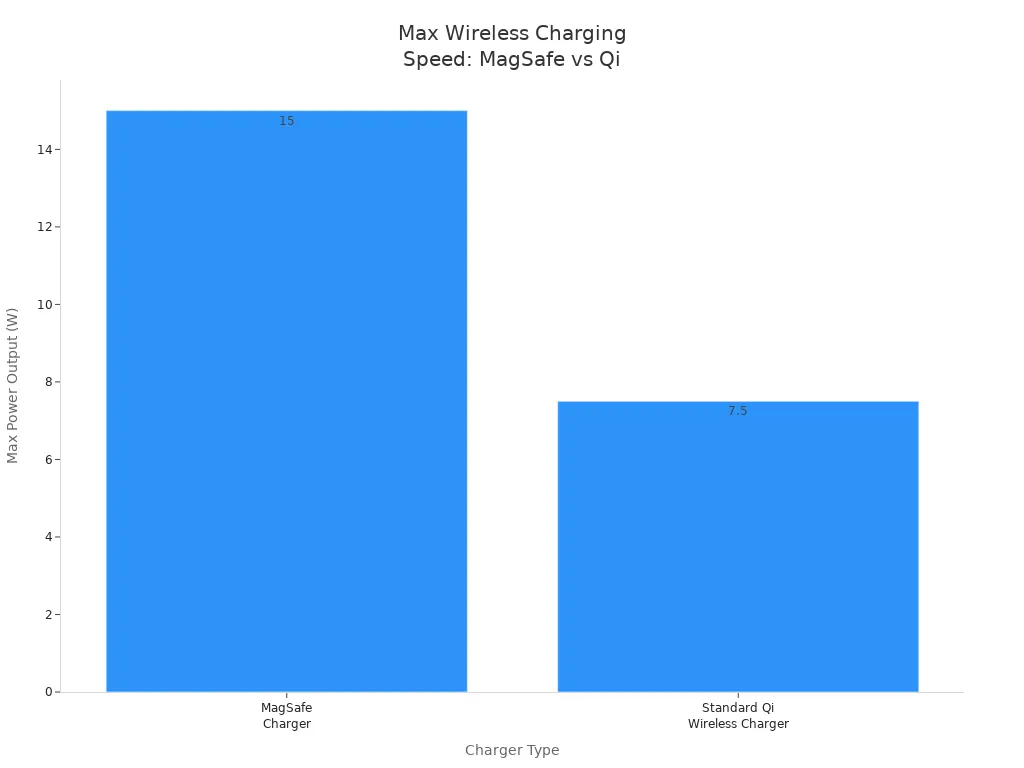
Magsafe cases help your iPhone charge wirelessly in the best way. The magnets in these cases snap your phone into the right spot on the charger. This makes charging faster and more efficient. Magsafe chargers can give up to 15W of power. Regular Qi chargers usually give only 5W to 7.5W for iPhones. The magnetic ring in magsafe cases keeps your phone steady. You do not have to worry about slow charging or your phone slipping off.
Tip: The magnets in magsafe cases help keep your phone cool. This makes charging safer for your device.
| Feature | MagSafe Charger | Standard Qi Wireless Charger |
|---|---|---|
| Magnetic Alignment | Yes | No |
| Optimized for iPhone | Yes (iPhone 12+) | Varies |
| Max Power Output | Up to 15W | Usually 5W–7.5W for iPhone |
| Secure Attachment | Yes | No |
accessories
Magsafe cases let you use many accessories with your iPhone. You can snap on chargers, wallets, battery packs, and car mounts easily. The magnets hold these accessories tight, so they do not fall off. Popular magsafe accessories include leather cases, clear cases, wallet cases, and battery pack cases
. You can also use magnetic holders and stands for hands-free use. The magnets make it simple to switch accessories without taking off your case.
- Magsafe accessories snap on for a safe fit.
- You can use your case with many brands, but magnet strength is different.
- Some cases from other brands have weaker magnets, so heavy accessories may not stay on well.
- Brands like Rhinoshield, ROKFORM, Magbak, and Pitaka use strong magnets, sometimes stronger than Apple’s cases.
Note: Always look for the magsafe logo or words like “magsafe-compatible” or “designed for magsafe” to make sure your case and accessories work together.
safety
Magsafe technology is safe for most people, but there are some things to know. The magnets in magsafe cases are made to not mess with your iPhone’s battery or other parts. Apple tests these magnets to make sure they hold accessories well but do not cause problems. If you have a pacemaker or another medical implant, you need to be careful. Studies show magsafe magnets can affect pacemakers and defibrillators if they get too close—about 1.5 cm. Apple and the FDA say to keep your iPhone and magsafe accessories at least 6 inches (15 cm) away from medical devices.
- Keep magsafe cases and accessories away from medical implants.
- Do not use accessories with extra magnets or metal near the camera, as this can cause problems with your phone.
- Always follow safety tips from Apple and your doctor if you use medical devices.
Magsafe cases use strong magnets to hold things tight but also follow safety rules for daily use. You can use your iPhone safely, but always remember special safety needs.
common magsafe questions
do all cases have magnets?
You might think every iPhone case has magnets, but that is not true. Only MagSafe cases have a ring of magnets inside them. Most regular iPhone cases do not have any magnets at all. When you shop, look for cases that say “for MagSafe” in the name. Brands like OtterBox use these words to show which cases have magnets. You can also check for the MagSafe logo or read the product details for words like “MagSafe compatible” or “designed for MagSafe.” If you want to be sure, try snapping the case onto your iPhone. A real MagSafe case will stick tightly and line up with your phone’s magnets. Regular iPhone cases will not snap on or hold accessories.
Tip: Always read the case name and description before you buy. This helps you avoid cases that say they work with MagSafe but do not have real magnets.
will magsafe cases stick to metal?
A lot of people wonder if MagSafe cases will stick to metal things like fridges or car mounts. Normal MagSafe cases are made to hold accessories like chargers and wallets, not to stick hard to metal. The magnets in these cases only make a weak grip on metal. Your iPhone could slide off if you bump it or move it fast. Some brands, like Rokform, make special cases with stronger magnets and twist-locks. These cases can keep your phone on a truck mount or toolbox, even when you drive. If you want a case that sticks well to metal, pick one with strong, industrial magnets. Most MagSafe cases do not have this kind of strength.
- Standard MagSafe cases: weak hold on metal
- Rokform magnetic cases: strong grip, made for tough jobs
- For best results, use a case made for mounting if you need strong magnets
do you need a magsafe case?
You might ask if you really need a MagSafe case for your iPhone. If you use wireless charging or like to add things like wallets, battery packs, or stands, a MagSafe case makes things easier. The magnets help your phone charge faster and keep your accessories safe. Many people pick MagSafe cases for easy use, quick charging, and simple accessory changes. These cases work best with iPhone 12 and newer. If you have an older iPhone or worry about magnets hurting credit cards or medical devices, a regular case might be better. MagSafe cases cost more and may use a little more battery, but most people think the benefits are worth it.
| Reason to Choose MagSafe Case | Benefit |
|---|---|
| Wireless charging | Faster, easier charging |
| Accessory attachment | Secure fit for wallets, stands |
| Tech integration | Easy use with MagSafe gear |
| Convenience | Quick accessory changes |
Note: MagSafe magnets are safe for most credit cards and things. EMV chip cards are fine, but magnetic stripe cards can get damaged if they touch the magnets. Always keep sensitive items away from the magnets in your case.
MagSafe cases protect your phone well and make charging simple. The built-in magnets hold your phone and accessories tight. Good materials help your phone stay safe and last longer. This also helps your phone keep its value. Experts say you should choose a case that matches your style. Make sure it has a good grip and protects your phone from drops. If you want your phone to work great with accessories, pick a MagSafe case. It is a smart choice for easy use and strong protection.
FAQ
Can you use a MagSafe case with any iPhone?
You can use a MagSafe case with any iPhone, but only iPhone 12 and newer models have built-in MagSafe magnets. Older iPhones will fit, but you will not get the magnetic snap or fast charging.
Will MagSafe magnets damage your credit cards?
MagSafe magnets do not harm EMV chip cards. Magnetic stripe cards can lose data if they touch the magnets for a long time. You should keep your cards in a wallet with RFID protection or away from the magnet area.
Do MagSafe cases make your phone heavier?
MagSafe cases feel a bit heavier than regular cases. The magnets add a small amount of weight. Most people do not notice the difference in daily use.
Can you use a MagSafe case with a screen protector?
You can use a MagSafe case and a screen protector together. The magnets in the case do not affect the screen protector. Both work well to protect your phone.
How do you know if your case is MagSafe?
Look for the MagSafe logo or words like “MagSafe compatible” on the packaging. You can also feel a strong snap when you attach the case to your iPhone. If accessories stick firmly, your case is MagSafe.
